表格 §
指定每列宽度,有多列的宽度相同 §
- 指定列的宽度
p{.14\textwidth}
- 多列宽度相同,如
| c |*{5}{p{.14\textwidth}|}(第一列为c,剩下的5列使用p指定宽度)
表格抬头的斜线分隔符(Table Heads with Diagonal Lines) §
- 使用
diagbox包
- 引用包
\usepackage{diagbox}
- 在格子内使用
\diagbox[height=3\line, width=0.15\linewidth]{Detail}{State}
- 调整布局,如
\raisebox{-2.5em}{\diagbox{\\ \\Interacting\\objects}{\\Relations}}
- 使用
\backslashbox
表格中一格内容的换行 §
- 使用
\newline
- 使用
makecell包,但是如果用p指定了列的排版方式话,这种方式不能正确编译
- 引用
\usepackage{makecell}
- 在格子内使用
\makecell{Some really \\ longer text}
表格内容垂直方向对齐 §
\usepackage{stackengine}
\newcommand\xrowht[2][0]{\addstackgap[.5\dimexpr#2\relax]{\vphantom{#1}}}
\begin{document}
    \begin{table}[h]
      \begin{tabular}{|c|l|}
        \hline
         col1 & col2 \\
        \hline\xrowht[()]{10pt}
        1 & 2g \\
        \hline\xrowht{20pt}
        3 & 4 \\
        \hline\xrowht{30pt}
        5 & 6 \\
        \hline\xrowht{40pt}
        7 & 8 \\
        \hline
      \end{tabular}
    \end{table}
- 使用
adjustbox。引用包\usepackage{adjustbox},然后表格的内容用\adjustbox{valign=t}{...}包裹。如\adjustbox{valign=t}{\includegraphics[height=100px]{figures/img.jpg}或\adjustbox{valign=t}{\makecell{test1\\test2}}
在两列排版中横跨整页的表格 §
- 使用
begin{table*},配置其在文中的位置时与添加图例类似
- 排版问题通过引用
\usepackage{dblfloatfix}包修正
dblfloatfix allow to place floats at the bottom of the page
- 序号问题:由于上述的原因(跨双列的图片/表格总会被放置到下一页),所以需要通过
\setcounter{table}{x}来强制指定编号。第二个参数x修改为需要指定的编号。
单元格的融合 §
%multi-column
\multicolumn{number cols}{align}{text}% align: l,c,r
%multi-row
\usepackage{multirow}
\multirow{number rows}{width}{text}
- 列融合
列的融合中第一个参数是融合多少列,第二个参数是对齐方式,表格的分割线也在这里添加,第三个参数为格子中的内容
如
\multicolumn{2}{c|}{your text},融合两列,居中并添加
- 行融合
第二个参数为宽度,不设置宽度可以用
{*},如\multirow{2}{*}{your text}
接下来的n-1行相应位置应为空
- 行和列同时融合:
\multicolumn{2}{c}{\multirow{2}{*}{Multi-col-row}}&X\\
- 部分格子行融合后,表格分割线的长度。括号内为出现在从第几列到第几列
\cline{1-2}
- 表格的分割线或者边框出现缺失:是不是遗漏了
\multicolumn中的第二个参数{c|}中后面的竖线符号
代码示例 §
- 效果
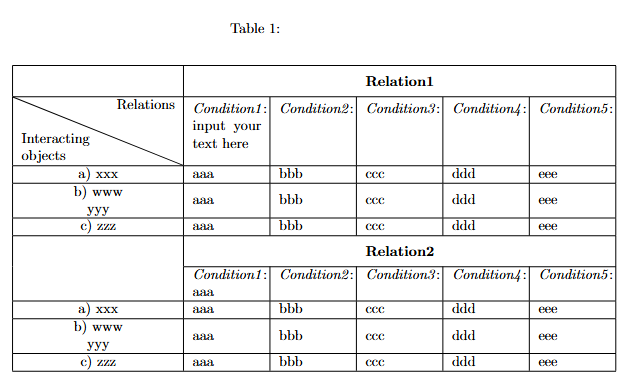
- 代码
\usepackage{diagbox}
\usepackage{makecell}
\usepackage{stackengine}
\usepackage{multirow}
\newcommand\xrowht[2][0]{\addstackgap[.5\dimexpr#2\relax]{\vphantom{#1}}}

\begin{document}

\begin{table*}[t]
\caption{}
\label{table:object_finger_states}
\begin{center}
\begin{tabular}{ | c  |*{5}{p{.14\textwidth}|} }
    \hline\xrowht{15pt}
     & \multicolumn{5}{c|}{\textbf{Relation1}} \\
    \hline
    \raisebox{-1.5em}{\diagbox{\\Interacting\\objects}{Relations}}&
    \textit{Condition1}:\newline input your text here  & \textit{Condition2}: & \textit{Condition3}:\newline  & \textit{Condition4}:\newline & \textit{Condition5}:\newline \\
    \hline
    a) xxx &
    aaa & bbb& ccc &  ddd & eee\\
    \hline
    \makecell{b) www\\yyy}&
    aaa & bbb& ccc &  ddd & eee\\
    \hline
    c) zzz &
    aaa & bbb& ccc &  ddd & eee\\
    \hline\xrowht{15pt}
     \multirow{2}{*}{} & \multicolumn{5}{c|}{\textbf{Relation2}} \\
    \cline{2-6}
     & \textit{Condition1}:\newline aaa  & \textit{Condition2}: & \textit{Condition3}:\newline  & \textit{Condition4}:\newline & \textit{Condition5}:\newline  \\
    \hline
    a) xxx &
    aaa & bbb& ccc &  ddd & eee\\
    \hline
    \makecell{b) www\\yyy}&
    aaa & bbb& ccc &  ddd & eee\\
    \hline
    c) zzz &
    aaa & bbb& ccc &  ddd & eee\\
    \hline
\end{tabular}
\end{center}
\end{table*}